Using charts in Excel can be a very powerful tool when used correctly. They can help to quickly visualize trends, and analyze results. The charts, however are useless if the person who is looking at them can't tell what the data is that they are trying to analyze. Excel helps the user by inserting labels in key points to help the user identify what they are looking at. If … [Read more...]
How to Use Paste Special in Excel
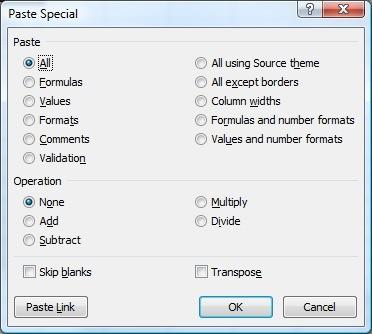
Being able to copy and paste a cell's information from one location to another is a great time saving feature, but sometimes you don't need to copy everything from the source cell. Thankfully, Microsoft Excel will allow you to copy a cell and paste only selected information if you wish. The menu below is a screenshot of the Paste Special menu from Excel 2007, which, except … [Read more...]
Create a User Defined Function
Excel allows you to create your own "User Defined Functions" (UDF) that can be used the same way as any other built-in function in Excel (i.e. IF, SUM, VLOOKUP, etc.). With a little knowledge of VBA code, you can create your own function to do pretty much whatever you want. To illustrate how to create a UDF, we'll create a function that calculates fuel consumption in miles … [Read more...]
Data Validation to Avoid Duplicate Values
Suppose you have a spreadsheet where you are entering a list of unique values, such as invoice numbers, customer names, etc. You don't want to duplicate any of the data, as this would cause problems down the road, but at the same time the list might be too large for you to manually verify that no duplicate values have been entered. You can use Data Validation to ensure that … [Read more...]
Drop Down Lists To Create Hyperlinks
As discussed in a previous tip, adding a drop down list to your worksheet allows the users of the worksheet to enter information in a neat, consistent format. The example in the previous tip emphasized the importance of having consistent information when summarizing information in a PivotTable. Another use is to store lists of information, which could be anything, but in … [Read more...]