In large worksheets, it is especially useful to be able to view a cell that contains summary data, such as totals. This can become tedious if your totals are at the end of your worksheet, while the data you're editing is at the beginning, causing you to have to scroll down to be able to see the totals. If you use Excel's Watch Window, you can keep your worksheet's summary … [Read more...]
Automatically Create an Index for Your Excel File
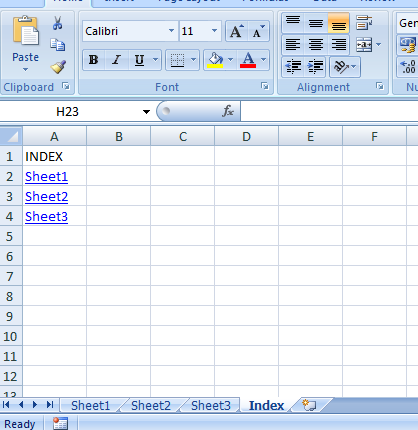
Do you want one central location where you can easily navigate to any worksheet in your file, and then navigate back with one click? This macro lets you quickly and easily create an index in Excel that lists all sheets in your workbook. The best part is that the index excel macro updates itself every time you select the index sheet! Indexing in Excel made simple. If you need … [Read more...]
Send Emails From Excel
Often times you'll find yourself working on a file in Excel that needs to be sent to a co-worker as an attachment. If you store your files on a shared network drive, it could take a little while to find your file, even if you know exactly where it is located. Even then, you may have to worry about attaching the wrong file if there are several saved with similar file … [Read more...]
Using PivotTables
Note: To work along with this tip, you can download the PivotTable Example file. The download file does not contain the PivotTables referred to below, it simply contains the source data so you can follow the steps to create the same PivotTables. PivotTables are a useful way to quickly summarize data and display it in an easy to read format. Their biggest problem is that not … [Read more...]
Using Text to Columns
If you have a list of data in a column, formatted in a similar manner throughout that you wish to separate into several columns, you can use Excel's Text to Columns feature to separate this information. For example, say your list is in column A and it contains a list of customer email addresses. You want to retrieve just the part before the "@", because that is also their ID … [Read more...]